

- Display sponsored products from brands bidding through a retail media platform (RMP) like Criteo, CitrusAd, and Zitcha.
- Show personalized recommendations from a machine learning recommendation engine.
- Promote items chosen by real-time bidding or A/B testing systems.
How external source groups work
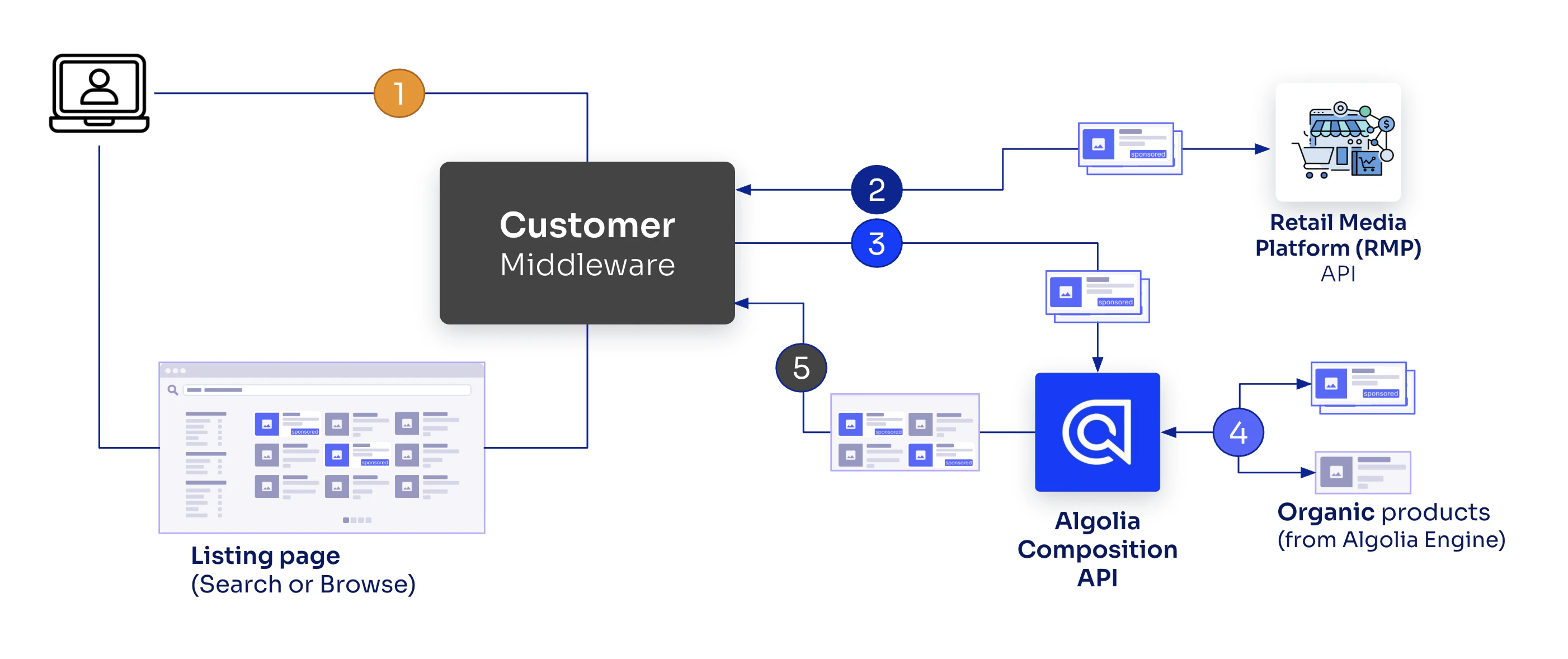
- A user’s search or browse action calls the middleware, which then calls the retail media platform and Algolia.
- Middleware retrieves sponsored products from the retail media platform (API call 1).
- Middleware calls Algolia’s Composition API with request and sponsored products (API call 2).
- Algolia re-ranks sponsored results (optional) and merges these with .
- The Composition API returns a unified response which the middleware forwards.
Configure an external source group
To configure an external source group, you need to create a composition.Create a composition
If you haven’t already, create a composition for your dynamic results :- Go to Merchandising Studio and open Merch tools > Compositions.
- Click + Create Composition.
- Name your composition (for example, “Product results - United States”), select the main , and save.
Add an external source group
- Go to Merch tools > Compositions > Composition Rules.
- Select your composition from the drop-down menu.
- Click + New Composition Rule.
- Define conditions for when this group should appear (for example, query contains “camera” or category is “Electronics”).
- Click + Add group.
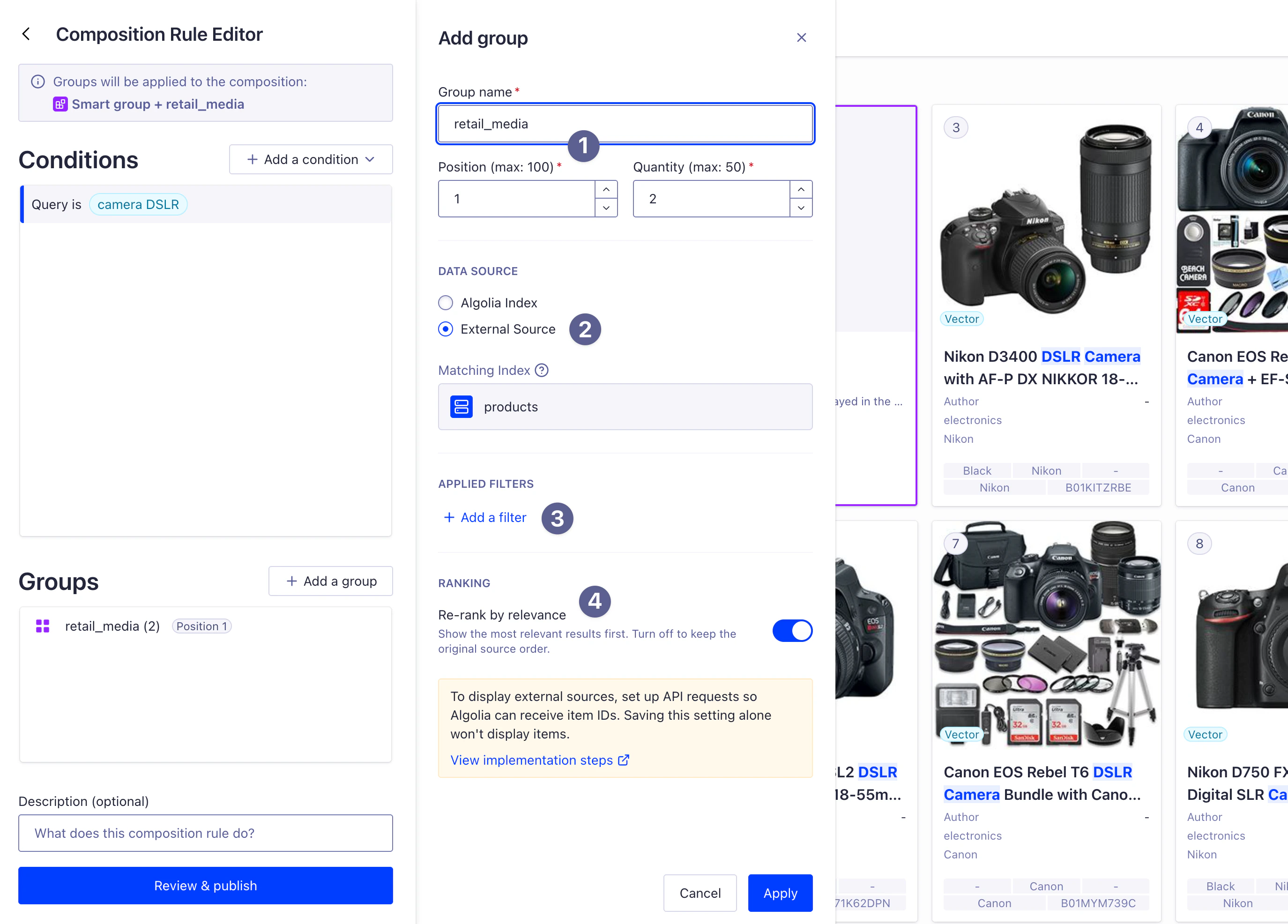
- Set a unique group key, for example,
retail_media(used when passing object IDs) (1) - Under Data Source, select External Source. (2)
- Optional. Add filters to constrain the external source results. For example, add
in_stock:trueto only show sponsored products that are available. (3) - Optional. Configure Re-rank by relevance (defaults to enabled). When enabled, Algolia reorders the object IDs you provide based on relevance to the user’s query. When turned off, items appear in the exact order you specify. (4)
- Save the group and publish the composition rule.
You must pass this exact group key (for example,
retail_media) in the injectedItems object when calling the Composition API.
The key links your API request to the group defined in Merchandising Studio.Pass object IDs at query time
When calling the Composition API, include the object IDs from your external source in the request. Your implementation should:- Call your external source API (for example, a retail media platform).
- Extract the object IDs from the response.
- Pass the object IDs to Algolia’s Composition API.
Example: integrate external data sources into your search UI
JavaScript
You’re responsible for ensuring that the , , and configuration sent to your external source (such as a Retail Media Platform) matches the configuration sent to Algolia.
This ensures that sponsored products are relevant to the user’s search context and filter configuration.
Metadata
You can optionally add ametadata field to each injected item, with extra information from your external source.
Algolia doesn’t use this metadata for ranking, but includes it with the search results.
This makes it useful for:
- Campaign attribution: include campaign IDs, bid amounts, or advertiser information for analytics.
- Extra attributes: add attributes that aren’t in your Algolia index but that you need for display or tracking.
metadata field accepts strings, numbers, boolean values, and nested objects:
JavaScript
Performance considerations
For optimal performance, limit external source groups to fewer than 50 object IDs per request. Requesting more than 50 items can slow down search responses.Behavior details
External source groups interact with search results in three ways: re-ranking, deduplication, and filtering. This keeps results consistent and relevant.Re-ranking by relevance
Re-rank by relevance is on by default. When it’s on, Algolia applies your index’s ranking formula to the object IDs from the external source. This ensures the most relevant sponsored items appear first within the group. For example, if your external source provides 5 object IDs for “camera,” Algolia scores each item based on how well it matches the query and reorders them accordingly within the group. When turned off, items appear in the exact order you specify in the API request.Deduplication
Algolia automatically deduplicates results across groups and organic results, so each item appears only once. By default, Algolia uses thehighestInjected strategy.
This strategy keeps items in their injected group positions, ahead of organic results.
If an objectID appears in more than one group, Algolia keeps the first occurrence and removes later duplicates.
You can configure the deduplication strategy when you create rules, to control how Algolia resolves duplicates.
For detailed information about available strategies and how to configure them, see Deduplication strategy.
Combine with filters
You can add filters to external source groups to enforce extra constraints. For example:Handle missing or filtered object IDs
Algolia skips object IDs from external sources if theobjectID:
- Isn’t in the index.
- Doesn’t match the current query, filters, or other constraints: the item is in the index, but Algolia filters it out of organic results. This ensures your external source injects only relevant items.
Example use case: retail media platform integration
A typical retail media platform integration looks like this:JavaScript
Integrate with your frontend
After configuring the backend integration, update your frontend to use the Composition API client instead of the Search API client. For InstantSearch, replace your search client initialization:JavaScript
Regulatory requirements
In most regions (including the US, EU, and Canada), sponsored products must have a visual badge (such as “Sponsored”) on each injected product. For that reason, add asponsored: true attribute to each sponsored product result.
Under regulations like the EU Platform to Business, you may also need to disclose how paid placements influence your search ranking.